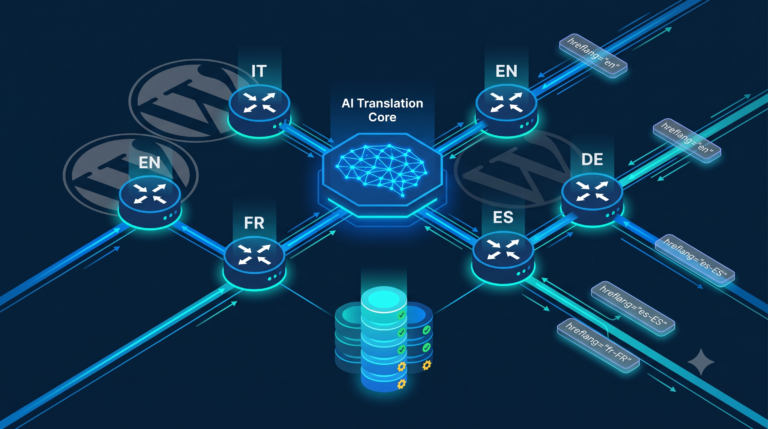
Generating contextually relevant featured images for hundreds of posts per day — without blocking PHP-FPM workers or exhausting Vertex AI quota — is a non-trivial control problem. This article dissects TS Featured Image Generator, a WordPress plugin that orchestrates Gemini multimodal generation, asynchronous WP-Cron scheduling, Imagick post-processing, and a multilingual thumbnail routing layer into a coherent, rate-aware pipeline.
The Engineering Problem: Synchronous AI Calls Kill PHP-FPM Workers
The naïve approach — calling a generative image API inline during save_post — creates a direct coupling between the HTTP request lifecycle and an external API whose P99 latency is measured in seconds, not milliseconds. With a PHP-FPM pool configured for 20 workers, even five concurrent post-saves that each block for 30 seconds exhaust 25% of the worker pool. If the generative API returns HTTP 429 (quota exhausted) and the caller implements inline retry with sleep, the situation degenerates: workers accumulate, new requests queue up, and the system enters a congestion collapse identical to a single-server queue running above its stability limit (arrival rate λ approaching service rate μ).
The plugin solves this by decoupling generation from the request path entirely. The save_post hook schedules a WP-Cron event; the actual Vertex AI call happens in a background process invoked by the cron scheduler, isolated from any web-serving worker.
System Architecture: Five Layers, Two Models, One Pipeline
The plugin decomposes into five distinct responsibility layers, each with a corresponding PHP class:
| Layer | Class | Responsibility |
|---|---|---|
| Transport & Auth | TS_Featured_Image_Vertex_AI | JWT generation, OAuth2 token exchange, Vertex AI HTTP call, rate limiting, 429 backoff |
| Orchestration | TS_Featured_Image_Generator | Post data assembly, Imagick watermark, WebP conversion, media library insertion, multilingual routing |
| SEO Intelligence | TS_SEO_Content_Generator | Yoast field population (focus keyphrase, meta description, SEO title), FAQ block injection, source link verification |
| Admin UI | TS_Featured_Image_Admin | WP-Admin column, bulk action registration, staggered cron scheduling |
| AJAX / Cron Bridge | TS_Featured_Image_Ajax | AJAX endpoint dispatchers, cron hook handlers for bulk operations |
Two separate Gemini models are used deliberately: gemini-3-pro-image-preview for multimodal image generation (with responseModalities: ["TEXT", "IMAGE"]) and gemini-3.1-pro-preview for pure text SEO generation. Using the image model for text-only tasks would waste quota and increase latency; using the text model for image tasks is simply not possible. This hard separation at the configuration level prevents any runtime confusion between the two generation paths.
Vertex AI Authentication: JWT RS256 from a Service Account
The plugin does not use an API key. It authenticates as a Google Cloud service account by constructing a signed JWT locally and exchanging it for a short-lived OAuth2 Bearer token. This pattern — defined in RFC 7523 — allows server-to-server authentication without user interaction and without exposing a long-lived credential in HTTP headers.
The JWT is assembled as three base64url-encoded segments: header, claims payload, and RSA-SHA256 signature over the first two. The private key never leaves the server; only the resulting token travels over the wire.
// JWT claim set for Google OAuth2 service account flow
$claim = [
    'iss' => $json_key['client_email'],          // service account identity
    'scope' => 'https://www.googleapis.com/auth/cloud-platform',
    'aud' => 'https://oauth2.googleapis.com/token',
    'exp' => $now + 3600,    // token valid for 1 hour
    'iat' => $now
];

// Sign with the service account private key (RS256)
openssl_sign(
    $header_encoded . '.' . $claim_encoded,
    $signature,
    openssl_pkey_get_private($json_key['private_key']),
    OPENSSL_ALGO_SHA256
);

// Exchange signed JWT for a Bearer access token
wp_remote_post('https://oauth2.googleapis.com/token', [
    'body' => [
        'grant_type' => 'urn:ietf:params:oauth:grant-type:jwt-bearer',
        'assertion'  => $jwt
    ]
]);
One structural observation: the get_access_token() method is duplicated across TS_Featured_Image_Vertex_AI, TS_Featured_Image_Generator::get_access_token_for_seo(), and TS_SEO_Content_Generator::get_access_token(). Each call issues an independent HTTP request to oauth2.googleapis.com, so a single post that triggers both image and SEO generation performs at least two token exchanges. Token caching — storing the Bearer token in a short-lived transient and reusing it until 5 minutes before expiry — would eliminate this overhead without changing the security model.
Prompt Engineering: Four Generation Modes and Visual Saliency
The prompt construction logic in TS_Featured_Image_Vertex_AI::build_prompt() implements four distinct generation modes, selected by two boolean flags derived from post metadata: $avoid_person (from _ts_is_real_person_subject) and whether a $main_entity is present (from _ts_main_entity, only propagated for Daily Trend posts).
| avoid_person | main_entity | Generation Strategy |
|---|---|---|
| false | null | High-impact photo, no text, no real persons, pure visual hook |
| false | set | Photo + entity text/logo overlay, 40% central saliency, CTR micro-element |
| true | null | Conceptual art, extreme symbolism, no faces, no text |
| true | set | Symbolic/surreal composition with entity text injected |
The most engineered path is avoid_person=false, main_entity=set. The prompt explicitly specifies visual saliency constraints that map directly onto perceptual psychology and CTR optimization:
// Visual saliency constraints embedded in the prompt
$text_injection_instruction =
    // subject must cover ~40% of the central image area
    "- **Visual Saliency**: Il soggetto/logo '{$main_entity}' deve occupare circa " .
    "il 40% dello spazio centrale dell'immagine.\n" .
    // luminance contrast >= 30% between subject and background
    "- **Contrasto Luminanza (Y)**: Il valore di luminanza del soggetto centrale " .
    "deve differire dallo sfondo di almeno il 30%.\n" .
    // micro-distractor near focal point to guide eye movement and increase CTR
    "- **Punto di Fuoco (CTR Hook)**: Inserisci un micro-elemento di disturbo vicino " .
    "all'area principale per guidare l'occhio e alzare il CTR.\n";
The 30% luminance contrast requirement directly references the Weber–Fechner law: the perceived difference between two stimuli is proportional to the ratio of their intensities, not their absolute difference. A subject at Y=0.5 against a background at Y=0.35 (ΔY=0.3, relative contrast=43%) will be perceived as clearly distinct across display environments with varying gamma curves. This is not a stylistic choice; it is a constraint derived from the transfer function of the human visual system.
Content safety for real-person posts is enforced at the prompt level ("NO PERSONE, NO VOLTI, NO MANI, NO SAGOME UMANE"), not as a post-processing filter. This is architecturally correct: delegating safety to the generation model is more reliable than attempting to detect faces in the output and retrying, which would introduce additional latency and API calls.
Rate Limiting and Exponential Backoff under HTTP 429
The plugin implements two independent rate-limiting mechanisms operating at different time scales.
The first is a global intra-process rate limiter in wait_for_rate_limit(), enforcing a minimum 10-second interval between consecutive Vertex AI calls. It uses a single WP transient (ts_vertex_ai_last_request) as a timestamp register:
private static function wait_for_rate_limit(): void {
    $last_request = get_transient('ts_vertex_ai_last_request');
    if ($last_request) {
        $elapsed = time() - $last_request;
        if ($elapsed < 10) {
            sleep(10 - $elapsed); // block this worker until the window clears
        }
    }
    set_transient('ts_vertex_ai_last_request', time(), 60);
}
This design has a correctness issue in a multi-process PHP-FPM environment: the read-check-write sequence on the transient is not atomic. Two cron processes starting simultaneously will both read the same $last_request value, both calculate a wait time of zero, and both proceed to call the API concurrently. The correct fix is to use update_option() with an optimistic lock (compare-and-swap on a version field) or to serialize cron execution at the OS level via a file lock (flock()). In practice, WP-Cron processes triggered by separate HTTP requests will have their own system call timing, so the race window is narrow but not zero.
The second mechanism handles the API-level feedback loop. When Vertex AI returns HTTP 429, the error propagates through the call stack as a WP_Error with code rate_limit_429. The async handler in the plugin bootstrap catches it and schedules a retry with binary exponential backoff:
if ($result->get_error_code() === 'rate_limit_429') {
    $retry_count = (int) get_post_meta($post_id, '_ts_featured_image_retry_count', true);

    if ($retry_count < 3) {
        update_post_meta($post_id, '_ts_featured_image_retry_count', ++$retry_count);

        // Delay sequence: 300s (5m), 600s (10m), 1200s (20m)
        $delay = 300 * pow(2, $retry_count - 1);

        wp_schedule_single_event(
            time() + $delay,
            'ts_generate_featured_image_async',
            [$post_id]
        );
    } else {
        // Give up after 3 attempts; human intervention required
        delete_post_meta($post_id, '_ts_featured_image_retry_count');
    }
}
The retry counter is persisted in post meta rather than in memory, which means it survives process restarts and is visible to monitoring systems. After a successful generation, the counter is explicitly deleted, preventing state accumulation across regeneration requests. The 3-attempt ceiling with total maximum delay of 35 minutes (5+10+20) is a reasonable steady-state design for a quota that resets on a per-minute or per-day basis, though the absolute values should be tuned against the actual Vertex AI quota tier in use.
The Image Processing Pipeline: Temp Files, Imagick, WebP, and XMP
The Vertex AI response carries the generated image as a base64-encoded inlineData blob within the candidates[0].content.parts array. The MIME type can be any image/* variant; the plugin validates this prefix before decoding. The decoded binary is written to a uniquely named temporary file in the WordPress uploads directory, then passed through a processing pipeline:
Step 1 — Watermark composition. Imagick loads both the generated image and the brand logo PNG. The logo is resized to a fixed bounding box (64×64px by default) using the Lanczos filter (superior sharpness at downsampling compared to bilinear). It is composited at the bottom-right corner using COMPOSITE_OVER, which correctly handles PNG alpha channels.
// Position: bottom-right with configurable margin
$posX = $mainWidth  - TS_FEATURED_IMAGE_LOGO_WIDTH  - TS_FEATURED_IMAGE_LOGO_MARGIN;
$posY = $mainHeight - TS_FEATURED_IMAGE_LOGO_HEIGHT - TS_FEATURED_IMAGE_LOGO_MARGIN;

$mainImage->compositeImage($logoImage, Imagick::COMPOSITE_OVER, $posX, $posY);
Step 2 — WebP conversion. The composited image is re-encoded as WebP at quality 80. For photographic content at 1920×1080 this typically yields 150–350 KB, compared to 800–1200 KB for equivalent JPEG at quality 85. The choice of quality 80 is a reasonable operating point on the rate-distortion curve for this content type.
Step 3 — SEO filename generation. If a _ts_main_entity meta is set (Daily Trend posts), the filename derives from the entity slug plus a 4-character hash of the post title, avoiding collisions between posts about the same entity. Otherwise, the post slug is used. A YmdHis timestamp appended to the slug guarantees uniqueness across regenerations.
Step 4 — XMP metadata injection. TS_Image_Metadata::inject() embeds a full XMP packet into the WebP file using Imagick's profileImage('xmp', ...). The XMP payload covers the Dublin Core schema (dc:title, dc:description, dc:creator, dc:rights, dc:subject for post tags), the XMP basic schema (xmp:CreatorTool), and exif GPS coordinates hard-coded to Rome. The rationale for embedding coordinates in AI-generated images is to provide a geographic signal to image search crawlers, associating the content with the site's geographic target market.
// XMP packet structure embedded as a binary profile in the WebP file
$xmp = '' . "\n";
$xmp .= '' . "\n";
$xmp .= ' ' . "\n";
$xmp .= ' ' . "\n";
$xmp .= ' ' .
'' . htmlspecialchars($title) . ' ' .
' Step 5 — Cleanup guarantee. The temporary file is deleted in a finally block wrapping the entire processing sequence. This ensures cleanup occurs even if Imagick throws an uncaught exception during watermarking. Using finally rather than explicit cleanup after each error branch is the correct RAII-equivalent pattern in PHP for resource management without true destructors.
SEO Intelligence Layer: Dual-Model Strategy and Junk Term Filtering
The SEO generation subsystem in TS_SEO_Content_Generator populates six Yoast SEO fields per post: focus keyphrase, meta description, SEO title, three intro list sentences, up to six source links, and a complete FAQ block injected directly into the post content as a Gutenberg block.
For posts originating from the Daily Trend pipeline, the system applies a dual-title strategy (Magnetic / News) instead of the standard single SEO title:
| Title Slot | WordPress Field | Optimization Target | Max Length |
|---|---|---|---|
| Magnetic Title | _yoast_wpseo_title + _yoast_wpseo_opengraph-title | Google Search + Google Discover feed CTR | 60 chars |
| News Title (H1) | post_title | Page authority, journalistic tone | 70 chars |
The Magnetic Title is written to both the standard SEO title meta and the OpenGraph title meta. For Discover, the Open Graph title is what appears in the feed card. The plugin hooks into wpseo_opengraph_title to strip any brand suffix that Yoast may have appended dynamically, ensuring the card title matches exactly what the model generated.
A Junk Terms dictionary is maintained per language. The prompt explicitly forbids these terms in generated titles:
// Junk term blocklist injected into the title generation prompt
$junk_terms = [
    'it' => 'stravolge tutto, addio, shock, annuncio shock, da non credere, ' .
            'incredibile, pazzesco, fine di un\'era, incubo, disastro, ' .
            'batosta, stangata, caos, delirio',
    'en' => 'changes everything, goodbye, shock, shocking announcement, ' .
            'unbelievable, incredible, crazy, end of an era, nightmare, ' .
            'disaster, blow, chaos, delirium, you won\'t believe',
    // ... fr, de, es, pt, ro
];
This is a negative-space constraint on the generation: rather than specifying what vocabulary to use, it specifies what to avoid. The model's instruction-following capability handles the rest. The terms selected map to patterns consistently penalized by Google's Helpful Content System in high-CTR/low-dwell-time scenarios — they are signals of clickbait rather than editorial quality.
The source link generation subsystem is particularly noteworthy: it implements a self-healing verification loop. After the model generates a set of institutional source URLs, each URL is validated with an HTTP HEAD (or GET fallback) request. Invalid URLs trigger a repair prompt back to the model, providing the specific error code and asking for a corrected or alternative source from the same domain. The loop runs up to 3 times per invalid source before discarding it.
// Agentic repair loop for broken source links
foreach ($sources as $source) {
    $verification = self::verify_url($source['url']);

    $retry = 0;
    while (!$verification['valid'] && $retry < 3) {
        $retry++;
        // Feed the error back to the model with context
        $repaired = self::repair_source_link(
            $source,
            $verification['code'],  // e.g. 404, 301, curl_error
            $post,
            $lang_name
        );
        if ($repaired) {
            $verification = self::verify_url($repaired['url']);
            $source = $repaired;
        }
    }

    if ($verification['valid']) {
        $validated_sources[] = $source;
    }
}
This is a minimal closed-loop control system: the verifier provides feedback (HTTP error code) to the generator (Gemini), which produces a new candidate, which the verifier re-evaluates. The loop terminates either at success (output meets the validity predicate) or at the iteration limit. The latency cost is acceptable because source link generation runs asynchronously via cron, not in the web request path.
Multilingual Thumbnail Routing via get_post_metadata Filter
WordPress stores the featured image as a single post meta entry: _thumbnail_id. A naïve multilingual system would create separate posts for each language translation and assign different thumbnails to each post ID. The plugin takes a different approach: it uses custom meta keys (_ts_featured_image_id_{lang}) to store language-specific thumbnails on the same post ID, and intercepts the metadata read path to transparently substitute the correct thumbnail based on the current language context.
add_filter('get_post_metadata', 'ts_featured_image_filter_thumbnail', 10, 4);

function ts_featured_image_filter_thumbnail($value, $post_id, $meta_key, $single) {
    if ($meta_key !== '_thumbnail_id') return $value;

    // Static flag prevents infinite recursion from nested get_post_meta calls
    static $filtering = false;
    if ($filtering) return $value;

    $filtering = true;
    $language_code = get_post_meta($post_id, '_tsm_language_code', true);
    $filtering = false;

    // Default language: fall through to standard WordPress behavior
    if (empty($language_code) || $language_code === TuttoSemplice_Multilingual::get_default_language()) {
        return $value;
    }

    // Language-specific thumbnail takes precedence
    $filtering = true;
    $lang_thumbnail_id = get_post_meta($post_id, '_ts_featured_image_id_' . $language_code, true);
    $filtering = false;

    return $lang_thumbnail_id
        ? ($single ? $lang_thumbnail_id : [$lang_thumbnail_id])
        : $value; // fall back to default language thumbnail
}
The static $filtering guard is critical. Without it, the filter triggers itself recursively: the get_post_meta() calls inside the filter body would invoke get_post_metadata again for the same post, which would re-enter the filter, creating an unbounded recursion stack. The static variable persists across re-entrant calls within the same PHP process, effectively implementing a mutex for the filter body.
The fallback chain is: language-specific thumbnail → standard WordPress _thumbnail_id (which holds the default-language image). This means a translated post with no dedicated generated image automatically inherits the original image — a graceful degradation with zero additional database queries.
Async Bulk Processing: Staggered WP-Cron Queue
The admin bulk action handler schedules one WP-Cron event per selected post, with a configurable stagger interval between events to avoid burst-firing API calls. The intervals are calibrated by operation weight:
// Stagger intervals per operation type (seconds between consecutive jobs)
$interval = match(true) {
    str_contains($doaction, 'featured_images') => 30, // image gen: ~10-30s API call
    $doaction === 'generate_seo_all'            => 60, // full SEO batch: multiple API calls
    $doaction === 'generate_comments'           => 45, // comment gen: Gemini call
    default                                     => 15  // single SEO fields: fast text gen
};

foreach ($post_ids as $index => $post_id) {
    wp_schedule_single_event(
        time() + ($index * $interval),
        $config['hook'],
        [$post_id]
    );
}
For a bulk selection of 50 posts with image generation, this schedules events across a 25-minute window (50 × 30s). The 30-second inter-job interval is intentionally wider than the intra-process rate limiter's 10-second window, providing a safety margin that accounts for variable API response times and the overhead of the token exchange.
WP-Cron is triggered by web traffic (pseudo-cron), not by a real system-level scheduler. On low-traffic sites this can cause cron jobs to run late. The mitigation is to configure a real cron trigger via cPanel or a server-side crontab calling wp-cron.php at a fixed interval. The plugin does not handle this configuration automatically — it is an operational concern outside the plugin's scope.
Cache Invalidation Cascade: WPO and Cloudflare
After a featured image is set or SEO metadata is updated, the plugin triggers a two-layer cache purge. The first layer targets the application-level page cache (WP-Optimize): the post's rendered HTML is invalidated along with the homepage and feed pages, since new content changes both archive listings and the main feed. The second layer targets the Cloudflare edge cache via the WPO_Cloudflare_Cache_Sync integration, purging the post URL and related cached assets from Cloudflare's PoPs.
private static function clear_caches(int $post_id): void {
    // Layer 1: application cache (WP-Optimize page cache)
    if (class_exists('WPO_Page_Cache')) {
        WPO_Page_Cache::delete_single_post_cache($post_id);
        WPO_Page_Cache::delete_homepage_cache();
        WPO_Page_Cache::delete_feed_cache();
    }

    // Layer 2: Cloudflare edge cache (via WPO integration)
    if (class_exists('WPO_Cloudflare_Cache_Sync')) {
        WPO_Cloudflare_Cache_Sync::get_instance()
            ->purge_cloudflare_post($post_id);
    }
}
The cache purge is conditional on class existence, making the plugin loosely coupled to both WPO and Cloudflare. On installations without these plugins, the class_exists checks return false and the block is skipped. This is the correct pattern for optional integrations in WordPress plugins.
Systemic Bottleneck Analysis
Three structural bottlenecks deserve attention from an infrastructure perspective.
1. The 600-second API timeout. TS_FEATURED_IMAGE_API_TIMEOUT is set to 600 seconds. If a cron job is triggered by an HTTP request to wp-cron.php, the cron process inherits the PHP execution time limit and the web server's request timeout. NGINX typically has a default fastcgi_read_timeout of 60 seconds. A 600-second timeout in wp_remote_post() will almost certainly be truncated by NGINX before the PHP-level timeout fires, returning a 504 to the cron caller and orphaning the in-progress API call. The correct configuration is either to run cron via CLI (where there is no web server timeout) or to explicitly raise fastcgi_read_timeout for the cron endpoint URL pattern.
2. Memory pressure from Imagick on large images. Imagick decompresses images fully into memory before processing. A 1K image from Gemini (approximately 1280×720 at this size tier) decompresses to roughly 3.5 MB of raw RGBA data. Loading both the main image and the logo PNG simultaneously requires approximately 4–5 MB of PHP heap. For a server running both MySQL and PHP-FPM with constrained total RAM, this is manageable. However, if the Gemini API is upgraded to deliver 4K images (imageSize: "4K"), peak Imagick memory consumption increases to ~50 MB per cron job. With multiple concurrent cron processes, this becomes a real memory contention risk — particularly on shared-memory architectures where MySQL's InnoDB buffer pool and PHP-FPM's process memory compete for the same physical pages.
3. Duplicate JWT generation per request. As noted, the token exchange is not cached. Beyond the redundant HTTPS round-trip cost, repeated JWT construction involves openssl_sign() on the RSA private key — a computationally non-trivial operation on small VPS instances. Profiling this on a single-CPU environment would reveal whether this is a measurable bottleneck, but the correct design is to cache the token in a transient with a TTL of exp - 300 (5 minutes before expiry), eliminating both the network and CPU overhead for all requests within the token's validity window.
Gallery Integration and the Visual Hub Pattern
After being set as a post thumbnail, each generated image is also registered in a dedicated WordPress gallery post (ID defined in TS_FEATURED_IMAGE_GALLERY_ID). The gallery item record stores the post title, Yoast meta description or post excerpt as the image description, post categories and tags, and a direct permalink to the originating article. The image caption in the WordPress Media Library includes a link to a Visual Hub page that maps attachment IDs to their detail views.
This pattern decouples the image asset from the post: the gallery becomes an independently queryable catalog of all AI-generated images, navigable by category taxonomy. For a site running a high-volume Daily Trend pipeline, this provides a centralized audit surface — editors can review what Gemini generated for any given trending entity without navigating post-by-post.
Conclusion
TS Featured Image Generator is a well-decomposed plugin whose most valuable architectural properties are its strict separation between the web request path and all generative AI operations, its idempotent generation checks (skip if thumbnail already exists), and its graceful multilingual fallback chain. The exponential backoff system correctly models the 429 rate-limit response as a feedback signal rather than a terminal error, re-scheduling work into a future window where quota is available. The self-healing source link loop is an early example of a closed-loop agentic pattern embedded in a WordPress plugin — a design that will become increasingly common as AI-driven content pipelines mature. The remaining structural gaps — token caching, atomic rate limit enforcement, CLI-based cron execution, and Imagick memory planning for higher-resolution image tiers — are well-understood engineering problems with standard solutions, representing natural next steps in hardening this system for high-throughput autonomous publishing.